
Skip to product information
1 of 2

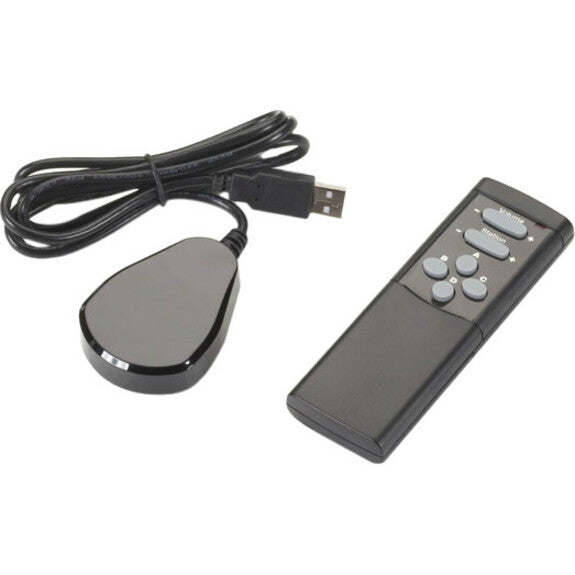
Black Box IR Remote Control & USB Receiver Pair

Black Box IR Remote Control & USB Receiver Pair

SKU: 1023032076      MFR: Black Box Corporation

Product Description

Black Box IR Remote Control & USB Receiver Pair - For Digital Signage System Digital Player - 1 Pack - TAA Compliant

Manufacturer : Black Box Corporation

Manufacturer Part No : ICOMP-RC

Features

  • Handheld IR unit for controlling iCompel content and volume at a display.
  • Push a button to select content (videos images and even layouts and playlists).
  • Also controls TV channel selection on iCompel TV capture versions.

Product Details

Product TypeDevice Remote Control
TAA CompliantYes
Connectivity TechnologyWireless
Brand NameBlack Box
Compatible DevicesDigital Signage System
Wireless TechnologyInfrared
Environmentally FriendlyYes
Environmental CertificationRoHS
Country of OriginSouth Korea
CompatibilityBlack Box Digital Signage Platforms & Players:
  • ICOMP01-R2
  • ICOMP01-VID-R2
  • ICOMP-VID
ManufacturerBlack Box Corporation
Product NameIR Remote Control & USB Receiver Pair
Manufacturer Part NumberICOMP-RC
Manufacturer Website Addresshttp://www.blackbox.com
Marketing Information
  • Features four assignable buttons for customized control and playing video on demand.
  • Enables administrators to delegate control of local content to local users.
  • Content inside a single zone or across multiple zones can be switched in sync.
  • Includes IR sensor on cord that plugs into iCompel unit's USB port.
  • "Pick list" creation function for restricting what TV content can be shown.

Control the content on your iCompel digital signage easily with this handheld remote control unit.

With it added to your iCompel system you can control what content and messaging is being displayed on-screen at any time - right at the screen itself. There's no need to log in to the user interface when you want to get a desired video or presentation to appear. At a press of a button you can select the content you want and switch layouts previously set up in iCompel.

What's more the remote control works right out of the box. Simply connect its IR receiver to a USB port on the iCompel and you have volume control in a matter of seconds.

Also if you're using an iCompel model with a built-in video card and receiving signals from the TV tuner (or audio from the radio tuner) you can use the remote to scan the channel list or change the channel volume without any configuration or set up. Without the remote this can be only done via the iCompel user interface.

Ideal applications.

  • Adding remote control functionality to your iCompel is ideal for:
  • Museums and exhibit applications.
  • Signage used for sales presentations at trade shows.
  • Anywhere you frequently need to adjust volume.

It's also great for giving viewers the ability to access content themselves such as in:

  • PoS/PoP retail applications.
  • Hotels and conference centers.
  • Government offices and DMVs.
  • Doctors' office and hospital waiting rooms.

In addition it's particularly useful in applications where installing touchscreen signage isn't practical or affordable - especially if you just want to give an audience on-demand access to several slideshows of content.

Flexible content control by zone.
Content can be switched inside a single zone or across multiple zones in sync. You can keep logos and branding fixed and uninterrupted in one part of the screen while videos and other content in other zones can be flexibly changed by pushing a remote control button.

The four buttons on the remote are assignable. By assigning specific video clips and layouts to the buttons they can be selected on demand. Choose a video to play in a zone when you want - for example when an important customer arrives - then when it ends that zone's playlist content will resume play according to its preset schedule.

The buttons also integrate with features of iCompel. Using the AdvanceTo feature you can interrupt the playing of a playlist and jump to a specific item in the playlist.

You can also set up "pick lists" containing playlists of specific content including certain TV stations or radio stations for example. These pick lists appear in a dropdown menu on the iCompel screen*. By restricting the selection to specific lists you can prevent users from playing objectionable content through your signage.

Packaged Quantity1
Limited Warranty1 Year
Certifications & StandardsCE
Additional Information
  • Features four assignable buttons for customized control and playing video on demand.
  • Enables administrators to delegate control of local content to local users.
  • Content inside a single zone or across multiple zones can be switched in sync.
  • Includes IR sensor on cord that plugs into iCOMPEL unit's USB port.
  • "Pick list" creation function for restricting what TV content can be shown.
View full details
Regular price $239.99 USD
Regular price Sale price $239.99
Sale Sold out

Back Order

Get it by Wed, Mar 25 - Mon, Mar 30


Update


Shipping calculated at checkout.

Black Box IR Remote Control & USB Receiver Pair - For Digital Signage System Digital Player - 1 Pack - TAA Compliant

Manufacturer : Black Box Corporation

Manufacturer Part No : ICOMP-RC

Features

  • Handheld IR unit for controlling iCompel content and volume at a display.
  • Push a button to select content (videos images and even layouts and playlists).
  • Also controls TV channel selection on iCompel TV capture versions.

Product Details

Product TypeDevice Remote Control
TAA CompliantYes
Connectivity TechnologyWireless
Brand NameBlack Box
Compatible DevicesDigital Signage System
Wireless TechnologyInfrared
Environmentally FriendlyYes
Environmental CertificationRoHS
Country of OriginSouth Korea
CompatibilityBlack Box Digital Signage Platforms & Players:
  • ICOMP01-R2
  • ICOMP01-VID-R2
  • ICOMP-VID
ManufacturerBlack Box Corporation
Product NameIR Remote Control & USB Receiver Pair
Manufacturer Part NumberICOMP-RC
Manufacturer Website Addresshttp://www.blackbox.com
Marketing Information
  • Features four assignable buttons for customized control and playing video on demand.
  • Enables administrators to delegate control of local content to local users.
  • Content inside a single zone or across multiple zones can be switched in sync.
  • Includes IR sensor on cord that plugs into iCompel unit's USB port.
  • "Pick list" creation function for restricting what TV content can be shown.

Control the content on your iCompel digital signage easily with this handheld remote control unit.

With it added to your iCompel system you can control what content and messaging is being displayed on-screen at any time - right at the screen itself. There's no need to log in to the user interface when you want to get a desired video or presentation to appear. At a press of a button you can select the content you want and switch layouts previously set up in iCompel.

What's more the remote control works right out of the box. Simply connect its IR receiver to a USB port on the iCompel and you have volume control in a matter of seconds.

Also if you're using an iCompel model with a built-in video card and receiving signals from the TV tuner (or audio from the radio tuner) you can use the remote to scan the channel list or change the channel volume without any configuration or set up. Without the remote this can be only done via the iCompel user interface.

Ideal applications.

  • Adding remote control functionality to your iCompel is ideal for:
  • Museums and exhibit applications.
  • Signage used for sales presentations at trade shows.
  • Anywhere you frequently need to adjust volume.

It's also great for giving viewers the ability to access content themselves such as in:

  • PoS/PoP retail applications.
  • Hotels and conference centers.
  • Government offices and DMVs.
  • Doctors' office and hospital waiting rooms.

In addition it's particularly useful in applications where installing touchscreen signage isn't practical or affordable - especially if you just want to give an audience on-demand access to several slideshows of content.

Flexible content control by zone.
Content can be switched inside a single zone or across multiple zones in sync. You can keep logos and branding fixed and uninterrupted in one part of the screen while videos and other content in other zones can be flexibly changed by pushing a remote control button.

The four buttons on the remote are assignable. By assigning specific video clips and layouts to the buttons they can be selected on demand. Choose a video to play in a zone when you want - for example when an important customer arrives - then when it ends that zone's playlist content will resume play according to its preset schedule.

The buttons also integrate with features of iCompel. Using the AdvanceTo feature you can interrupt the playing of a playlist and jump to a specific item in the playlist.

You can also set up "pick lists" containing playlists of specific content including certain TV stations or radio stations for example. These pick lists appear in a dropdown menu on the iCompel screen*. By restricting the selection to specific lists you can prevent users from playing objectionable content through your signage.

Packaged Quantity1
Limited Warranty1 Year
Certifications & StandardsCE
Additional Information
  • Features four assignable buttons for customized control and playing video on demand.
  • Enables administrators to delegate control of local content to local users.
  • Content inside a single zone or across multiple zones can be switched in sync.
  • Includes IR sensor on cord that plugs into iCOMPEL unit's USB port.
  • "Pick list" creation function for restricting what TV content can be shown.

Recently Viewed