
Skip to product information
1 of 11

Kensington SD3600 5Gbps USB 3.0 Dual 2K Docking Station - HDMI/DVI-I/VGA - Windows

Kensington SD3600 5Gbps USB 3.0 Dual 2K Docking Station - HDMI/DVI-I/VGA - Windows

SKU: 1032826423      MFR: ACCO Brands Corporation

GTIN: 85896339915

Product Description

Kensington SD3600 5Gbps USB 3.0 Dual 2K Docking Station - HDMI/DVI-I/VGA - Windows - for Notebook/Tablet PC - USB 3.0 - 2 Displays Supported - 2K - 6 x USB Ports - 4 x USB 2.0 - 2 x USB 3.0 - USB Type-A - Network (RJ-45) - 1 x HDMI Ports - HDMI - DVI - VGA - Audio Line Out - Microphone - Wired - Windows macOS

Manufacturer : ACCO Brands Corporation

Manufacturer Part No : K33991WW

Product Details

Product TypeDocking Station
HDMIYes
Number of HDMI Ports1
DVIYes
VGAYes
Network (RJ-45)Yes
Audio Line OutYes
Total Number of USB Ports6
Number of USB 2.0 Ports4
Number of USB 3.0 Ports2
Number of Displays Supported2
Headphone/Microphone Combo PortYes
Kensington Security SlotYes
USB Type-AYes
Screen Mode Supported2K
Country of OriginChina
Height6.50"
Width9.63"
Depth3.25"
Connectivity TechnologyWired
Brand NameKensington
Operating System SupportedWindows
ManufacturerACCO Brands Corporation
MicrophoneYes
Product ModelSD3600
Product NameSD3600 5Gbps USB 3.0 Dual 2K Docking Station - HDMI/DVI-I/VGA - Windows
Device SupportedNotebook/Tablet PC
Manufacturer Part NumberK33991WW
Manufacturer Website Addresshttp://www.acco.com
Marketing Information

Features | Dual HD Video Output

With an HDMI port and a DVI port you can expand your workspace and increase productivity by adding 2 external screens. The HDMI connects directly while the DVI port can be connected directly or through the included DVI-to-VGA or DVI-to-HDMI adapter.

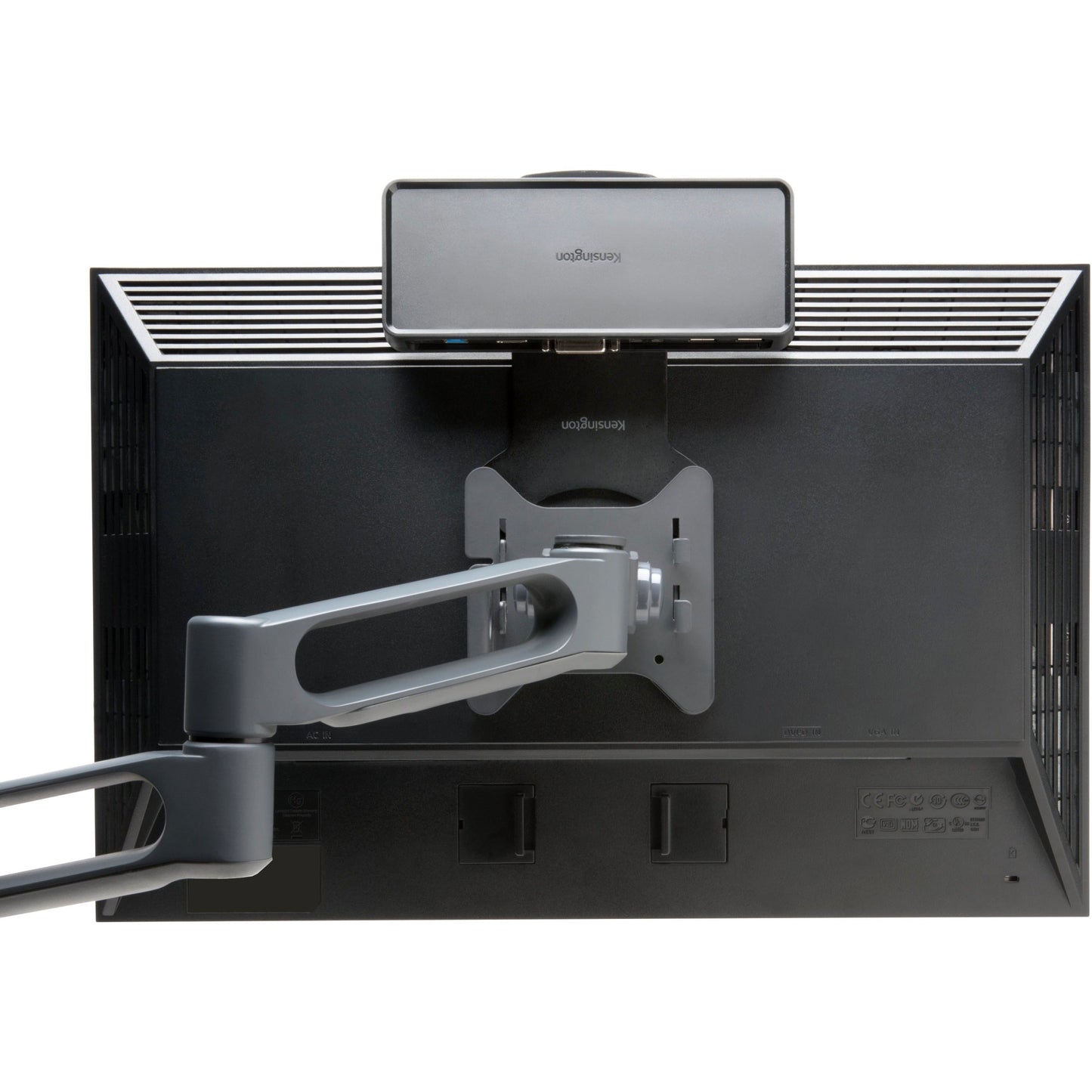
Zero Footprint Mounting

The dock can be mounted to the back of a 75mm or 100mm VESA-compatible external monitor (mounting plate sold separately) allowing you to keep your desktop less cluttered

Extend or Mirror Modes

Extend mode allows you to drag an open application to an external monitor so you can work across multiple screens while Mirror mode allows you to replicate the content that's on your computer display to an external screen

2 Front USB 3.0 Ports

Transfer data at up to 5Gbps with the fast and powerful ports which are positioned on the front of the dock which is ideal for devices like smartphones tablets or external hard drives

4 Rear USB 2.0 Ports

The ideal place to connect all your peripheral productivity accessories like a keyboard mouse or printer to help keep cables or wireless receivers hidden from view

Display Settings Software

Allows you to easily switch display modes change the master monitor or adjust the alignment and position of your screens. Our corporate install support provides for mass installation via the Microsoft® server.

Gigabit Ethernet Port

Provides a reliable wired connection to a network or the Internet

Free Kensington DockWorks™ Software

Enables the best connection performance and security from your Kensington dock.

Preserve the convenience of one-cable connectivity to your entire desktop setup with the SD3600 Universal Docking Station. We all take our laptops to meetings. With a universal dock from Kensington you can disconnect and reconnect your dual HD monitors mouse keyboard and all your other peripherals with a single USB cable. Plus the dock is capable of mounting to the back of a monitor leaving zero footprint on your desktop.

  • Best For: USB 3.0 Laptops Ultrabooks & Windows Tablets and Monitors that support up to 2K
  • Connection Technology: USB 3.0 (DisplayLink)
  • Compatibility: Windows 7 or above macOS 10.14
  • # of Monitors Supported: 2
  • Video Ports: 1 x HDMI v1.3 and 1 x DVI-I (VGA supported with included DVI to VGA adapter)
  • Maximum Resolution Supported: Single Monitor: 2560 x 1600 @ 60Hz and Dual Monitors: 2048 x 1152 @ 30Hz
  • DisplayLink driver installation required. Download software from kensington.com or via Windows update.
  • System Requirements: CPU: Dual-Core i3 2.8GHz or better and RAM: 2GB or higher
  • Warranty: 2 Years
  • Optimized for your Windows 11 docking station needs including support for Snap Layouts and Snap Groups
Packaged Quantity1
Limited Warranty2 Year
Host InterfaceUSB 3.0
View full details
Regular price $81.99 USD
Regular price Sale price $81.99
Sale Sold out

In Stock - 5 (Available by Thu, Dec 25 - Tue, Dec 30)


Update


Shipping calculated at checkout.

Kensington SD3600 5Gbps USB 3.0 Dual 2K Docking Station - HDMI/DVI-I/VGA - Windows - for Notebook/Tablet PC - USB 3.0 - 2 Displays Supported - 2K - 6 x USB Ports - 4 x USB 2.0 - 2 x USB 3.0 - USB Type-A - Network (RJ-45) - 1 x HDMI Ports - HDMI - DVI - VGA - Audio Line Out - Microphone - Wired - Windows macOS

Manufacturer : ACCO Brands Corporation

Manufacturer Part No : K33991WW

Product Details

Product TypeDocking Station
HDMIYes
Number of HDMI Ports1
DVIYes
VGAYes
Network (RJ-45)Yes
Audio Line OutYes
Total Number of USB Ports6
Number of USB 2.0 Ports4
Number of USB 3.0 Ports2
Number of Displays Supported2
Headphone/Microphone Combo PortYes
Kensington Security SlotYes
USB Type-AYes
Screen Mode Supported2K
Country of OriginChina
Height6.50"
Width9.63"
Depth3.25"
Connectivity TechnologyWired
Brand NameKensington
Operating System SupportedWindows
ManufacturerACCO Brands Corporation
MicrophoneYes
Product ModelSD3600
Product NameSD3600 5Gbps USB 3.0 Dual 2K Docking Station - HDMI/DVI-I/VGA - Windows
Device SupportedNotebook/Tablet PC
Manufacturer Part NumberK33991WW
Manufacturer Website Addresshttp://www.acco.com
Marketing Information

Features | Dual HD Video Output

With an HDMI port and a DVI port you can expand your workspace and increase productivity by adding 2 external screens. The HDMI connects directly while the DVI port can be connected directly or through the included DVI-to-VGA or DVI-to-HDMI adapter.

Zero Footprint Mounting

The dock can be mounted to the back of a 75mm or 100mm VESA-compatible external monitor (mounting plate sold separately) allowing you to keep your desktop less cluttered

Extend or Mirror Modes

Extend mode allows you to drag an open application to an external monitor so you can work across multiple screens while Mirror mode allows you to replicate the content that's on your computer display to an external screen

2 Front USB 3.0 Ports

Transfer data at up to 5Gbps with the fast and powerful ports which are positioned on the front of the dock which is ideal for devices like smartphones tablets or external hard drives

4 Rear USB 2.0 Ports

The ideal place to connect all your peripheral productivity accessories like a keyboard mouse or printer to help keep cables or wireless receivers hidden from view

Display Settings Software

Allows you to easily switch display modes change the master monitor or adjust the alignment and position of your screens. Our corporate install support provides for mass installation via the Microsoft® server.

Gigabit Ethernet Port

Provides a reliable wired connection to a network or the Internet

Free Kensington DockWorks™ Software

Enables the best connection performance and security from your Kensington dock.

Preserve the convenience of one-cable connectivity to your entire desktop setup with the SD3600 Universal Docking Station. We all take our laptops to meetings. With a universal dock from Kensington you can disconnect and reconnect your dual HD monitors mouse keyboard and all your other peripherals with a single USB cable. Plus the dock is capable of mounting to the back of a monitor leaving zero footprint on your desktop.

  • Best For: USB 3.0 Laptops Ultrabooks & Windows Tablets and Monitors that support up to 2K
  • Connection Technology: USB 3.0 (DisplayLink)
  • Compatibility: Windows 7 or above macOS 10.14
  • # of Monitors Supported: 2
  • Video Ports: 1 x HDMI v1.3 and 1 x DVI-I (VGA supported with included DVI to VGA adapter)
  • Maximum Resolution Supported: Single Monitor: 2560 x 1600 @ 60Hz and Dual Monitors: 2048 x 1152 @ 30Hz
  • DisplayLink driver installation required. Download software from kensington.com or via Windows update.
  • System Requirements: CPU: Dual-Core i3 2.8GHz or better and RAM: 2GB or higher
  • Warranty: 2 Years
  • Optimized for your Windows 11 docking station needs including support for Snap Layouts and Snap Groups
Packaged Quantity1
Limited Warranty2 Year
Host InterfaceUSB 3.0

Recently Viewed