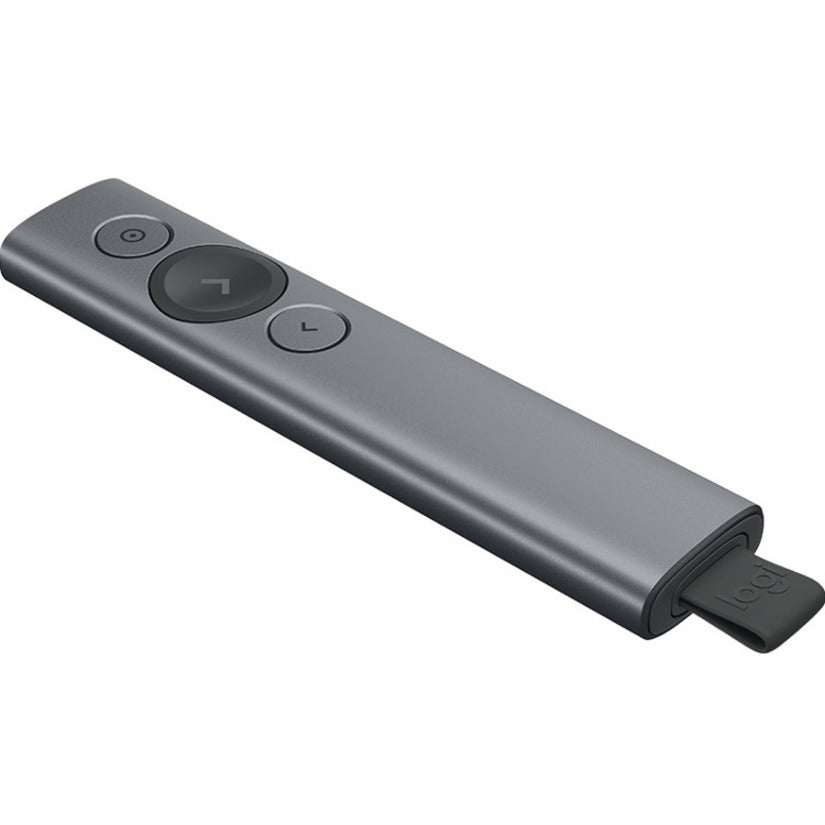

Logitech Spotlight Presentation Remote
SKU: 1038654225 MFR: Logitech
GTIN: 97855132079
Product Description
Logitech Spotlight Presentation Remote - Gyroscopic - Wireless - Bluetooth/Radio Frequency - Slate - USB - 3 Button(s)
Manufacturer : Logitech
Manufacturer Part No : 910-005216
Features
- Bluetooth/Radio Frequency wireless connectivity offers more freedom for people who want to control their Computers from a distance
- Gyroscopic movement detection for precise cursoring
Product Details
Take your company's next business presentation beyond traditional laser pointing. Spotlight advanced pointer system lets you precisely highlight or magnify areas of focus all with pixel-perfect detail. The selected area of focus is clearly visible to both the meeting room audience as well as business groups via video conference. Set the pointer mode with the easy-to-use Logitech Presentation App.
MOUSE-LIKE CURSOR CONTROL
The on-screen cursor can be used to play and pause videos open links show proprietary corporate content and enjoy a range of other rich content interaction. No need to break the flow of a business presentation or go near a mouse or laptop. With Spotlight both the presentation and the company comes shining through.
LOGITECH PRESENTATION APP
Pair Spotlight with its powerful app to set time alerts toggle pointer mode and customize actions. Configure the back button to go to a blank screen or to activate gesture-commanded volume control scrolling and more. The software can be installed remotely and silently for multiple users.Download the software in .exe format and use deployment tools such as SCCM to install it remotely. Specific command lines allow for silent installation and to disable automatic updates.Learn more in the software installation guide for macOS Windows.
SMART TIME MANAGEMENT
Spotlight quietly reminds the speaker when it's time to wrap up. The presentation remote vibrates five minutes before the end of a presentation and again when time is fully up. Speakers can eliminate distractions and awkward interruptions track presenting time and customize vibration alerts in the Logitech Presentation App.
DUAL CONNECTIVITY
Sleek portable and wireless Spotlight travels from home office to headquarters to center stage without a glitch. Connect to a computer via USB receiver or low energy Bluetooth®. Switch seamlessly between the two by plugging or unplugging the receiver. A discreet and convenient dock built into the base of the actual remote stores the USB receiver when not in use.
ADDITIONAL FEATURES
UNIVERSAL COMPATIBILITY
Spotlight Plus is optimized to work with Windows® Mac® OS and all leading presentation software including PowerPoint® Keynote® Adobe PDF Google Slides™ and Prezi.
30-METER OPERATING RANGE
Move and present freely from as far as 30 meters (100 ft) so you can own even the largest rooms. Range may vary based on environmental and computing conditions.
QUICK CHARGING
Quick charge in one minute for three hours of use - and use Spotlight Plus for three months on a full charge. When it's time to recharge Spotlight's battery indicator light glows red. Use the USB-C charging cable to top up the power. Charging time may vary based on environmental and computing conditions.
Back Order
Get it by Fri, Feb 06 - Wed, Feb 11
Update
Couldn't load pickup availability

Logitech Spotlight Presentation Remote - Gyroscopic - Wireless - Bluetooth/Radio Frequency - Slate - USB - 3 Button(s)
Manufacturer : Logitech
Manufacturer Part No : 910-005216
Features
- Bluetooth/Radio Frequency wireless connectivity offers more freedom for people who want to control their Computers from a distance
- Gyroscopic movement detection for precise cursoring
Product Details
Take your company's next business presentation beyond traditional laser pointing. Spotlight advanced pointer system lets you precisely highlight or magnify areas of focus all with pixel-perfect detail. The selected area of focus is clearly visible to both the meeting room audience as well as business groups via video conference. Set the pointer mode with the easy-to-use Logitech Presentation App.
MOUSE-LIKE CURSOR CONTROL
The on-screen cursor can be used to play and pause videos open links show proprietary corporate content and enjoy a range of other rich content interaction. No need to break the flow of a business presentation or go near a mouse or laptop. With Spotlight both the presentation and the company comes shining through.
LOGITECH PRESENTATION APP
Pair Spotlight with its powerful app to set time alerts toggle pointer mode and customize actions. Configure the back button to go to a blank screen or to activate gesture-commanded volume control scrolling and more. The software can be installed remotely and silently for multiple users.Download the software in .exe format and use deployment tools such as SCCM to install it remotely. Specific command lines allow for silent installation and to disable automatic updates.Learn more in the software installation guide for macOS Windows.
SMART TIME MANAGEMENT
Spotlight quietly reminds the speaker when it's time to wrap up. The presentation remote vibrates five minutes before the end of a presentation and again when time is fully up. Speakers can eliminate distractions and awkward interruptions track presenting time and customize vibration alerts in the Logitech Presentation App.
DUAL CONNECTIVITY
Sleek portable and wireless Spotlight travels from home office to headquarters to center stage without a glitch. Connect to a computer via USB receiver or low energy Bluetooth®. Switch seamlessly between the two by plugging or unplugging the receiver. A discreet and convenient dock built into the base of the actual remote stores the USB receiver when not in use.
ADDITIONAL FEATURES
UNIVERSAL COMPATIBILITY
Spotlight Plus is optimized to work with Windows® Mac® OS and all leading presentation software including PowerPoint® Keynote® Adobe PDF Google Slides™ and Prezi.
30-METER OPERATING RANGE
Move and present freely from as far as 30 meters (100 ft) so you can own even the largest rooms. Range may vary based on environmental and computing conditions.
QUICK CHARGING
Quick charge in one minute for three hours of use - and use Spotlight Plus for three months on a full charge. When it's time to recharge Spotlight's battery indicator light glows red. Use the USB-C charging cable to top up the power. Charging time may vary based on environmental and computing conditions.
Recently Viewed
We’re a veteran-owned small business with full-stack expertise. We’ll help you design, coordinate, and manage technology solutions that will drive your business forward.
- About Us
- Contact Us
- My Account
- Prospective Investors
Quick Links
Contracts
Contact Us
-
6402 Corporate Dr, Suite 103,
Indianapolis, IN 46278 - (317) 243-1750
- sales@tekmentum.com
- Mon-Fri: 8:00am-5:00pm
© 2005-2023, Tekmentum. All Rights Reserved. A KPaul, LLC Company.
- Choosing a selection results in a full page refresh.
- Opens in a new window.