
Skip to product information
1 of 2

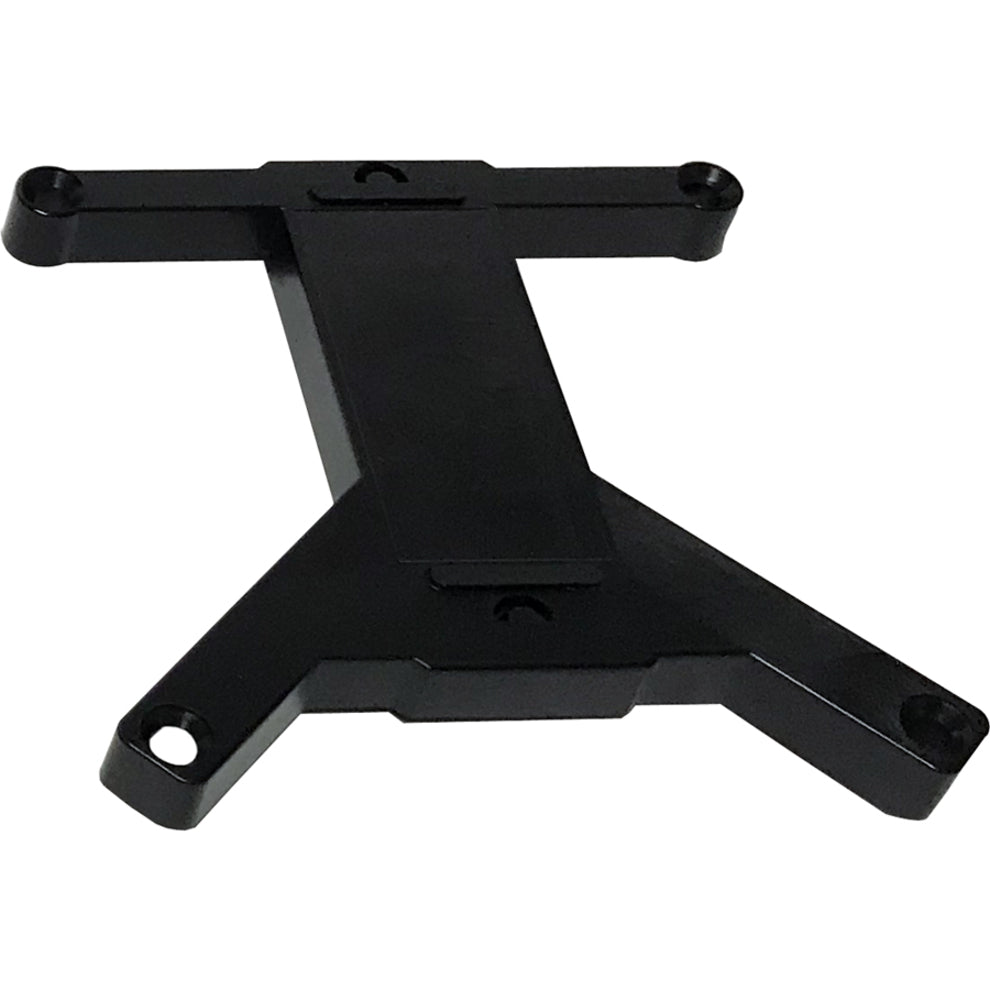
ScreenBeam Surface Mount for Display Receiver

ScreenBeam Surface Mount for Display Receiver

SKU: 1056511127      MFR: ScreenBeam Inc.

GTIN: 789286809292

Product Description

ScreenBeam Surface Mount for Display Receiver

Manufacturer : ScreenBeam Inc.

Manufacturer Part No : SB960MOUNT

Features

  • The ScreenBeam 960 Mounting Kit permits a ScreenBeam Wireless Display Receiver to be mounted and out of view for easier wireless display and presentation purposes.

Product Details

Product TypeSurface Mount
Country of OriginTaiwan
Brand NameScreenBeam
CompatibilityScreenBeam 960 Wireless Display Receiver (SBWD960A)
ManufacturerScreenBeam Inc.
Product NameSurface Mount
Device SupportedDisplay Receiver
Manufacturer Part NumberSB960MOUNT
Manufacturer Website Addresshttp://www.screenbeam.com
Marketing InformationThe ScreenBeam 960 Mounting Kit is an accessory kit and should be used with the ScreenBeam 960 Wireless Display Receiver (SBWD960A) that supports native screen mirroring extended desktop and interactive touch displays. The ScreenBeam 960 Mounting Kit permits a ScreenBeam Wireless Display Receiver to be mounted and out of view for easier wireless display and presentation purposes. The ScreenBeam 960 Mounting Kit allows a ScreenBeam 960 wireless display receiver to be mounted either utilizing the magnetic strip located in the center of the mounting kit unit of with the optional adhesive (3M VHB sticker).
Package Contents
  • ScreenBeam 960 Mounting Kit Base
  • ScreenBeam 960 Mounting Kit Quick Setup Guide Insert
  • 2 x clear Polybags Each Containing 4 ½" Screws Each
  • 1 x 3M VHB Sticker
  • 1 x USB Power Cable
Additional Information

Specifications:

After completing the following steps you will be able to attach ScreenBeam 960 to most metal surfaces magnetically. If a metal surface is not available you may use the optional adhesive (3M VHB sticker).

1.Place the magnetic mounting module onto the bottom of ScreenBeam 960.
2.Align the four screw holds of the magnetic mounting module with ScreenBeam 960's screw holes.
3.Install the provided screws into the screw holes.
4.(Optional) If the metal surface is not available you can put the provided adhesive onto the mounting module as an alternative.
5.(Optional) If your display is equipped with a 5V / 2A USB port you may use the provided USB-to-Barrel power cable. If the USB port's power is insufficient please use the power adapter that came with the ScreenBeam 960.

Key Selling Points:
The ScreenBeam 960 Mounting Kit permits a ScreenBeam Wireless Display Receiver to be mounted and out of view for easier wireless display and presentation purposes.

Product Features:

The ScreenBeam 960 Mounting Kit allows a ScreenBeam 960 wireless display receiver to be mounted either utilizing the magnetic strip located in the center of the mounting kit unit of with the optional adhesive (3M VHB sticker). Contents include one clear polybag containing: ScreenBeam 960 Mounting Kit Quick Setup Guide insert
ScreenBeam 960 Mounting Kit base
2 clear polybags each containing 4 ½" screws each
1 3M VHB sticker
1 USB power cable

View full details
Regular price $13.99 USD
Regular price Sale price $13.99
Sale Sold out

In Stock - 23 (Available by Tue, Dec 23 - Sun, Dec 28)


Update


Shipping calculated at checkout.

ScreenBeam Surface Mount for Display Receiver

Manufacturer : ScreenBeam Inc.

Manufacturer Part No : SB960MOUNT

Features

  • The ScreenBeam 960 Mounting Kit permits a ScreenBeam Wireless Display Receiver to be mounted and out of view for easier wireless display and presentation purposes.

Product Details

Product TypeSurface Mount
Country of OriginTaiwan
Brand NameScreenBeam
CompatibilityScreenBeam 960 Wireless Display Receiver (SBWD960A)
ManufacturerScreenBeam Inc.
Product NameSurface Mount
Device SupportedDisplay Receiver
Manufacturer Part NumberSB960MOUNT
Manufacturer Website Addresshttp://www.screenbeam.com
Marketing InformationThe ScreenBeam 960 Mounting Kit is an accessory kit and should be used with the ScreenBeam 960 Wireless Display Receiver (SBWD960A) that supports native screen mirroring extended desktop and interactive touch displays. The ScreenBeam 960 Mounting Kit permits a ScreenBeam Wireless Display Receiver to be mounted and out of view for easier wireless display and presentation purposes. The ScreenBeam 960 Mounting Kit allows a ScreenBeam 960 wireless display receiver to be mounted either utilizing the magnetic strip located in the center of the mounting kit unit of with the optional adhesive (3M VHB sticker).
Package Contents
  • ScreenBeam 960 Mounting Kit Base
  • ScreenBeam 960 Mounting Kit Quick Setup Guide Insert
  • 2 x clear Polybags Each Containing 4 ½" Screws Each
  • 1 x 3M VHB Sticker
  • 1 x USB Power Cable
Additional Information

Specifications:

After completing the following steps you will be able to attach ScreenBeam 960 to most metal surfaces magnetically. If a metal surface is not available you may use the optional adhesive (3M VHB sticker).

1.Place the magnetic mounting module onto the bottom of ScreenBeam 960.
2.Align the four screw holds of the magnetic mounting module with ScreenBeam 960's screw holes.
3.Install the provided screws into the screw holes.
4.(Optional) If the metal surface is not available you can put the provided adhesive onto the mounting module as an alternative.
5.(Optional) If your display is equipped with a 5V / 2A USB port you may use the provided USB-to-Barrel power cable. If the USB port's power is insufficient please use the power adapter that came with the ScreenBeam 960.

Key Selling Points:
The ScreenBeam 960 Mounting Kit permits a ScreenBeam Wireless Display Receiver to be mounted and out of view for easier wireless display and presentation purposes.

Product Features:

The ScreenBeam 960 Mounting Kit allows a ScreenBeam 960 wireless display receiver to be mounted either utilizing the magnetic strip located in the center of the mounting kit unit of with the optional adhesive (3M VHB sticker). Contents include one clear polybag containing: ScreenBeam 960 Mounting Kit Quick Setup Guide insert
ScreenBeam 960 Mounting Kit base
2 clear polybags each containing 4 ½" screws each
1 3M VHB sticker
1 USB power cable

Recently Viewed