
StarTech.com Thunderbolt 3 PCIe Expansion Chassis with DisplayPort - PCIe x16 - Thunderbolt 3 PCIe Enclosure - Thunderbolt 3 PCIe Box
SKU: 1041665989 MFR: StarTech.com
GTIN: 065030868440
Product Description
StarTech.com Thunderbolt 3 PCIe Expansion Chassis with DisplayPort - PCIe x16 - Thunderbolt 3 PCIe Enclosure - Thunderbolt 3 PCIe Box - Add an external PCI Express 3.0 x16 slot and a DP connection to a Thunderbolt 3 MacBook or laptop - Add a PCIe card such as an: SSD Ethernet Fiber video capture USB FireWire or eSATA card to a Thunderbolt 3 laptop - Thunderbolt 3 to PCIe
Manufacturer : StarTech.com
Manufacturer Part No : TB31PCIEX16
Features
- TAA Compliant
- Increased productivity with Thunderbolt 3 and up to 40Gbps bandwidth - twice the speed of Thunderbolt 2 (20Gbps) and eight times faster than USB 3.0 (5Gbps)
- Supports one 4K DisplayPort monitor and a second extended monitor display through the Thunderbolt 3 (USB-C) port
- Daisy chain up to six Thunderbolt 3 devices
- Supports 5K Thunderbolt displays
- Supports half-length and dual-slot PCIe card standards at all heights with standard profile slot brackets
- Provides a x16 4 lane PCIe 3.0 slot or interface
- Durable aluminum construction
- Works on Mac and Windows® computers
- Internal 60 mm cooling fan
Product Details
This Thunderbolt™3 PCIe expansion chassis lets you add a PCI Express card to your laptop or desktop computer through an external Thunderbolt 3 connection. The chassis also features a DisplayPort video output so you can connect an additional monitor to your laptop and supports Thunderbolt 3 daisy chaining so you can expand your workstation even further.
Expand the capabilities of your Thunderbolt 3 computer
The Thunderbolt 3 PCIe chassis makes it easy to expand your system with the capabilities you need to work at peak productivity. You can add many types ofPCI Express cards such as a PCIe USB 3.1/3.0/2.0 and USB-C SSD network eSATA FireWire or video capture cards. And with the speed and bandwidth support of Thunderbolt 3 and PCIe 3.0 you can enjoy many of the same port additions you would from the PCI Express expansion slots of a desktop system.
Extend your workstation
The external PCIe enclosure features a dedicated DisplayPort output that lets you add an additional display to your laptop or desktop computer. The enclosure features a secondThunderbolt 3 (USB-C) port that you can useto connect a secondary display (a USB-C video adapter may be required). With multiple extended displays you can work more efficiently by multitasking faster and avoid the hassle of continually repositioning several open windows or programs.
You can also use the second Thunderbolt 3 port to connect additional Thunderbolt USB and DisplayPort devices to your system. You can daisy chain up to six Thunderbolt 3 devices and expand your workstation to suit your specific requirements.
Increase productivity with faster speeds
Thunderbolt 3 is the fastest connection available which means you don't have to deal with the performance bottlenecks of a slower connection and can accomplish more in the same amount of time.
At up to 40Gbps this Thunderbolt 3 expansion chassis gives you the throughput to add displays to your laptop access files quickly and work without disruptions. It's easy to access and edit large uncompressed files such as videos and images on the fly making it ideal for dynamic on-site production.
The TB31PCIEX16 is backed by a StarTech.com 2-year warranty and free lifetime technical support.
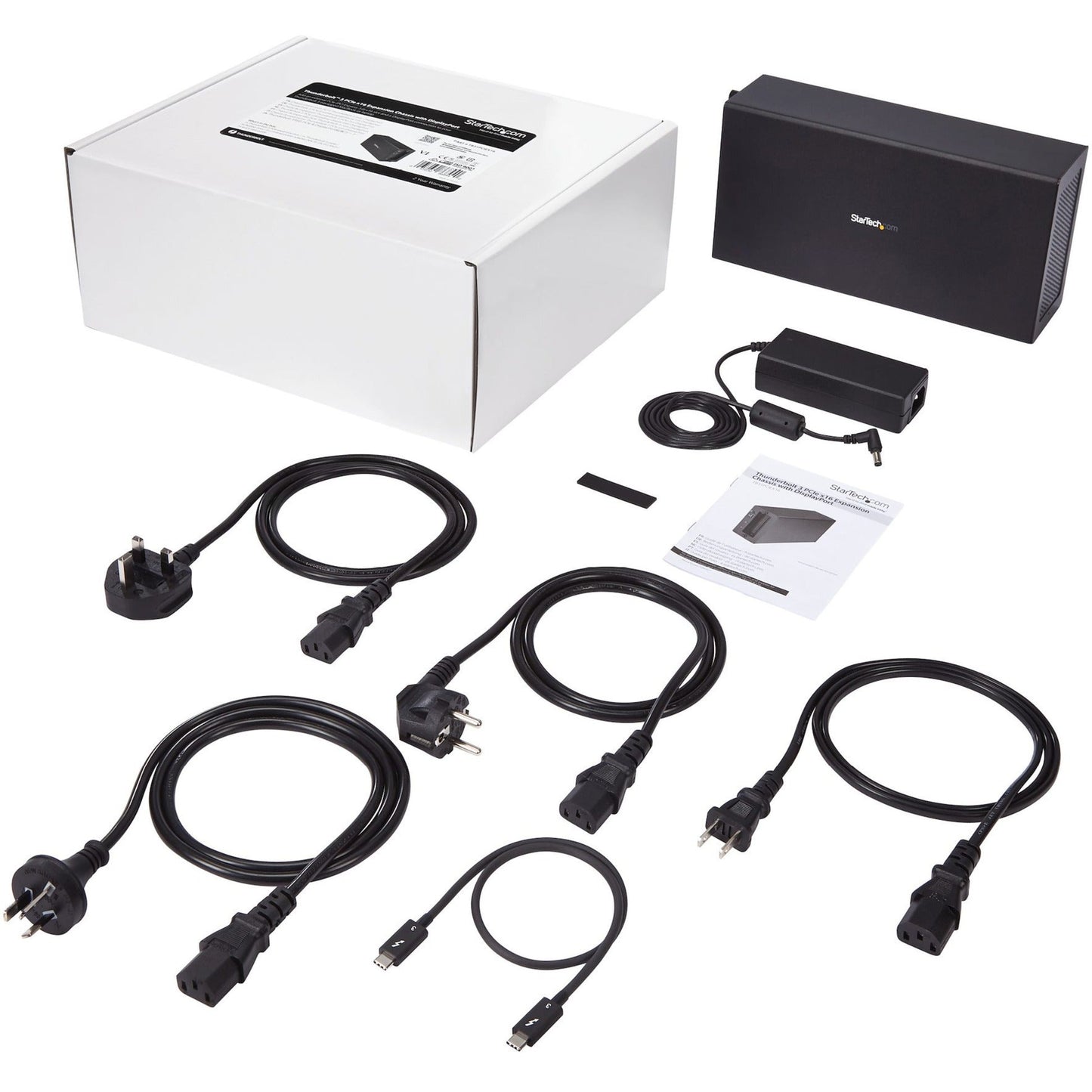
- Thunderbolt 3 PCIe Expansion Chassis with DisplayPort - PCIe x16
- 1 x Thunderbolt 3 cable
- 4 x Rubber feet
- 1 x Universal power adapter (NA/JP UK EU ANZ)
- 1 x Quick-start guide
In Stock - 546 (Available by Thu, Jun 25 - Tue, Jun 30)
Update
Couldn't load pickup availability

StarTech.com Thunderbolt 3 PCIe Expansion Chassis with DisplayPort - PCIe x16 - Thunderbolt 3 PCIe Enclosure - Thunderbolt 3 PCIe Box - Add an external PCI Express 3.0 x16 slot and a DP connection to a Thunderbolt 3 MacBook or laptop - Add a PCIe card such as an: SSD Ethernet Fiber video capture USB FireWire or eSATA card to a Thunderbolt 3 laptop - Thunderbolt 3 to PCIe
Manufacturer : StarTech.com
Manufacturer Part No : TB31PCIEX16
Features
- TAA Compliant
- Increased productivity with Thunderbolt 3 and up to 40Gbps bandwidth - twice the speed of Thunderbolt 2 (20Gbps) and eight times faster than USB 3.0 (5Gbps)
- Supports one 4K DisplayPort monitor and a second extended monitor display through the Thunderbolt 3 (USB-C) port
- Daisy chain up to six Thunderbolt 3 devices
- Supports 5K Thunderbolt displays
- Supports half-length and dual-slot PCIe card standards at all heights with standard profile slot brackets
- Provides a x16 4 lane PCIe 3.0 slot or interface
- Durable aluminum construction
- Works on Mac and Windows® computers
- Internal 60 mm cooling fan
Product Details
This Thunderbolt™3 PCIe expansion chassis lets you add a PCI Express card to your laptop or desktop computer through an external Thunderbolt 3 connection. The chassis also features a DisplayPort video output so you can connect an additional monitor to your laptop and supports Thunderbolt 3 daisy chaining so you can expand your workstation even further.
Expand the capabilities of your Thunderbolt 3 computer
The Thunderbolt 3 PCIe chassis makes it easy to expand your system with the capabilities you need to work at peak productivity. You can add many types ofPCI Express cards such as a PCIe USB 3.1/3.0/2.0 and USB-C SSD network eSATA FireWire or video capture cards. And with the speed and bandwidth support of Thunderbolt 3 and PCIe 3.0 you can enjoy many of the same port additions you would from the PCI Express expansion slots of a desktop system.
Extend your workstation
The external PCIe enclosure features a dedicated DisplayPort output that lets you add an additional display to your laptop or desktop computer. The enclosure features a secondThunderbolt 3 (USB-C) port that you can useto connect a secondary display (a USB-C video adapter may be required). With multiple extended displays you can work more efficiently by multitasking faster and avoid the hassle of continually repositioning several open windows or programs.
You can also use the second Thunderbolt 3 port to connect additional Thunderbolt USB and DisplayPort devices to your system. You can daisy chain up to six Thunderbolt 3 devices and expand your workstation to suit your specific requirements.
Increase productivity with faster speeds
Thunderbolt 3 is the fastest connection available which means you don't have to deal with the performance bottlenecks of a slower connection and can accomplish more in the same amount of time.
At up to 40Gbps this Thunderbolt 3 expansion chassis gives you the throughput to add displays to your laptop access files quickly and work without disruptions. It's easy to access and edit large uncompressed files such as videos and images on the fly making it ideal for dynamic on-site production.
The TB31PCIEX16 is backed by a StarTech.com 2-year warranty and free lifetime technical support.
- Thunderbolt 3 PCIe Expansion Chassis with DisplayPort - PCIe x16
- 1 x Thunderbolt 3 cable
- 4 x Rubber feet
- 1 x Universal power adapter (NA/JP UK EU ANZ)
- 1 x Quick-start guide
Recently Viewed
We’re a veteran-owned small business with full-stack expertise. We’ll help you design, coordinate, and manage technology solutions that will drive your business forward.
- About Us
- Contact Us
- My Account
- Prospective Investors
Quick Links
Contracts
Contact Us
-
6402 Corporate Dr, Suite 103,
Indianapolis, IN 46278 - (317) 243-1750
- sales@tekmentum.com
- Mon-Fri: 8:00am-5:00pm
© 2005-2023, Tekmentum. All Rights Reserved. A KPaul, LLC Company.
- Choosing a selection results in a full page refresh.
- Opens in a new window.