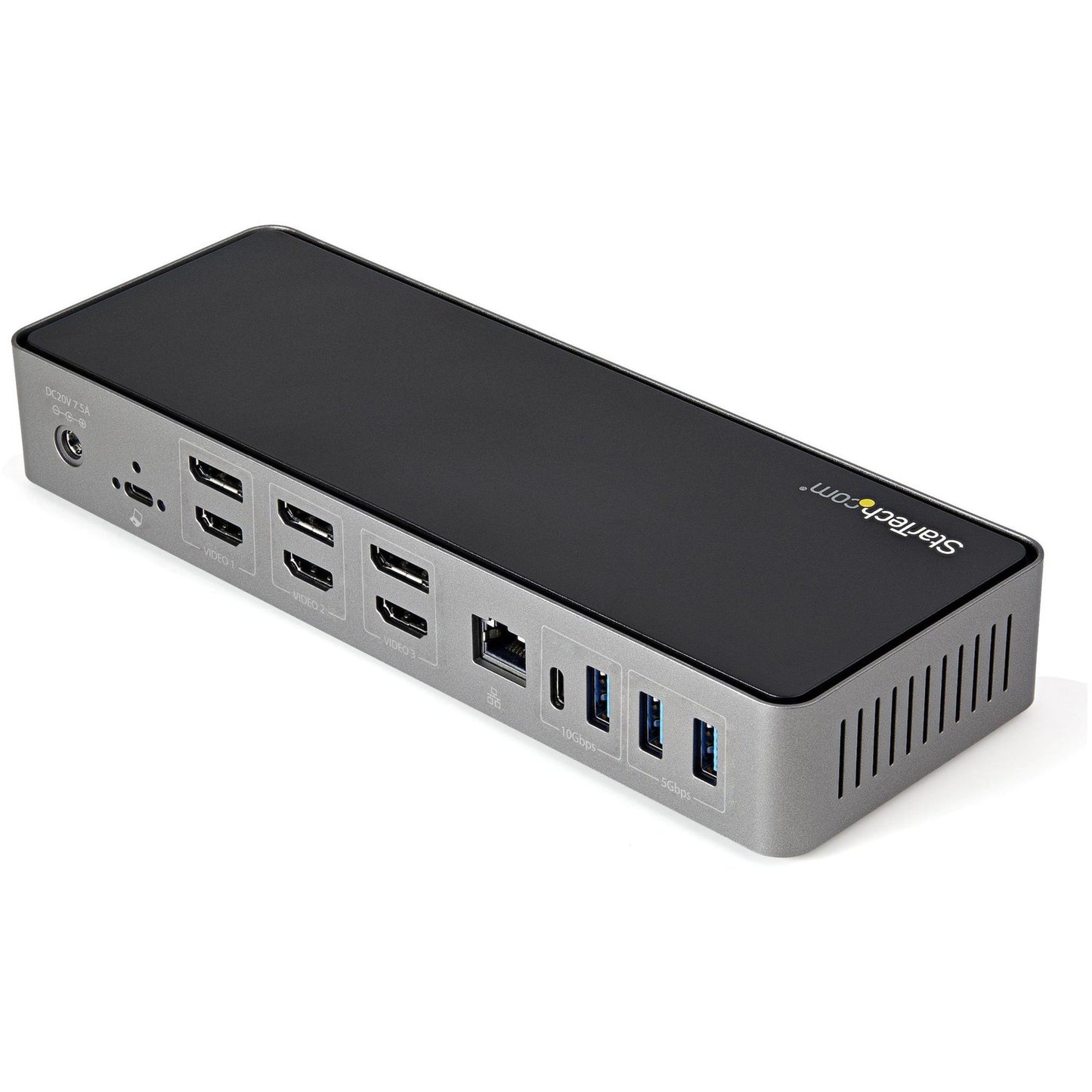

StarTech.com USB-C & USB-A Dock - Hybrid Triple Monitor Laptop Docking Station DisplayPort & HDMI 4K 60Hz/85W PD/6x USB/GbE/USB 3.1 Gen 2
SKU: 1065245125 MFR: StarTech.com
GTIN: 65030881937
Product Description
StarTech.com USB-C & USB-A Dock - Hybrid Triple Monitor Laptop Docking Station DisplayPort & HDMI 4K 60Hz/85W PD/6x USB/GbE/USB 3.1 Gen 2 - Universal hybrid USB-C USB-A dock (USB 3.1 Gen 2 10Gbps) - 4K triple monitor docking station with DisplayPort (DP 1.4) & HDMI 2.0 - 85W Power Delivery GbE & audio - 4x USB Type-A + 2x USB-C - Host port & USB-IF Certified combo cable w/screw lock
Manufacturer : StarTech.com
Manufacturer Part No : DK31C3HDPD
Features
- FLEXIBLE MULTI DISPLAY SETUP: USB 3.2 Gen 2 10Gbps Type-C/A dock supports dual or triple monitor setup (up to 3x 4K 60Hz) using any combination of the 3x DisplayPort 1.4 & 3x HDMI 2.0
- 85W POWER DELIVERY: Power & charge USB-C/Thunderbolt 3 and 4 workstation laptops/ultrabooks incl Lenovo X1 Carbon ThinkPad P Series Dell Latitudes Precision XPS 15 HP Spectre ZBook
- UNIVERSAL DISPLAYLINK DOCKING STATION: Hybrid dock incl. combo 2-in-1 USB-C/USB-A USB-IF Certified host cable; Supports up to 3 extended displays on MacBook Pro/Air w/ Intel M1 or M1 Pro/Max Windows macOS and Chrome OS
- 6-PORT USB HUB: 4x USB-A (1x 10Gbps) 2x USB-C (1x 10Gbps) incl. 2x BC 1.2 fast charge always-on front ports; USB-C Gen 1 & USB-A laptops will only support downstream port speeds up to USB 5Gbps
- DEPLOYMENT READY: Docking station features a K-slot 1m combo host cable; Gigabit Ethernet & headset ports; Windows MacOS Chrome OS; Mounting holes for mounting plates SSPMSUDWM/SSPMSVESA
- CONNECTIVITY TOOLS: Provided with this device the application improves performance and security featuring MAC Address Changer USB Event Monitoring Windows Layout & Wi-Fi Auto Switch utilities
Product Details
- Lenovo X1 Carbon
- Lenovo ThinkPad P Series
- Dell Latitude
- Dell Precision
- Dell XPS 15
- HP Spectre
- HP ZBook
- MacBook Pro 16
This USB-C Gen 2 10Gbps docking station turns your USB-C ® or Thunderbolt™ 3 MacBook Pro Windows laptop and Chromebook into a powerful workstation. A USB 3.2 Gen 2 Type-C dock features everything you need from triple HDMI or DisplayPort video outputs up to 4K 60 Hz to 10Gbps USB-C & USB-A downstream peripheral ports to 85W Power Delivery. Older USB-A laptops are supported through universal hybrid USB-C/USB-A cable included.
HDMI & DisplayPort for Triple Monitor Outputs
This USB-C Gen 2 docking station with DP 1.4 and HDMI 2.0 HDR support is a perfect choice for dual or triple monitor setup supporting up to triple 4K 60Hz display output with any combination of three DisplayPort or HDMI video interfaces on USB-C Gen 2 (with DP 1.4 support) laptops MacBooks and Windows-based Thunderbolt 3 laptops. Older USB-A laptops will only support dual monitor setup.
Host Display Output USB-C Gen 1 or 2 (with DP 1.4) Triple Display - 3x 4K 60Hz Thunderbolt 3 (DP 1.4 Supported) Triple Display - 3x 4K 60HzUSB-C Gen 1 (with DP 1.2)
Triple Display - 2x 4K 60Hz; 1x 4K 30Hz
USB-A or USB-C (No DP Alt Mode) Dual Display - 2x 4K 60HzPower & Charge with 85W Power Delivery
Power and charge USB-C/Thunderbolt 3 workstation laptops & ultrabooks with 85 watt PD Higher power delivery MORE than other USB-C 10G Triple monitor docks. Charge smartphones and other devices with two downstream front-facing charging ports with BC 1.2 for USB-A and USB-C devices. Fast-charge ports support always-on charging so devices will charge whether or not a host laptop is connected.
Plenty of Downstream USB Ports
This USB-C Gen 2 docking station features 6 downstream USB ports in total to connect USB peripherals.
- 1x USB-C 3.2 Gen 2 (10 Gbps)
- 1x USB-A 3.2 Gen 2 (10 Gbps)
- 1x USB-C 3.2 Gen 1 (5 Gbps)
- 3x USB-A 3.2 Gen 1 (5 Gbps)
Also included is a gigabit Ethernet port with PXE Boot and WoL support as well as 4-position TRRS stereo audio headset/mic port.
Additional Security Features
This USB-C/USB-A docking station comes with plenty of security features such as a screw-lock host port which includes a USB-IF Certified 1m 2-in-1 USB-C/USB-A screw-lock cable; a K-slot for a Kensington style laptop lock and holes to mount the dock on the desk or wall.
Connected Device Transparency with the StarTech.com MAC Address Changer Utility
The DK31C3HDPD includes a free Windows® application that enables you to better manage your enterprise network security. When you connect to your network through the ethernet port of the dock the computer's MAC address is typically not broadcast to the network as your network only sees the MAC address of the docking station. However the StarTech.com MAC Address Changer or Cloning software enables the USB-C dock to use MAC address spoofing of the connected Windows laptop rather than the MAC address of the dock itself. This ensures your network administrators have full visibility of each device on the network and can monitor and limit activity accordingly. To request access to our MAC Address Changer utility please contact our Technical Support Department by phone live chat or e-mail .
- Docking Station
- USB-C Screw Lock Cable with USB-A Adapter
- Universal Power Adapter (NA JP ANZ)
- Quick-Start Guide
This USB-C Gen 2 10Gbps docking station turns your USB-C ® or Thunderbolt™ 3 MacBook Pro Windows laptop and Chromebook into a powerful workstation. A USB 3.2 Gen 2 Type-C dock features everything you need from triple HDMI or DisplayPort video outputs up to 4K 60 Hz to 10Gbps USB-C & USB-A downstream peripheral ports to 85W Power Delivery. Older USB-A laptops are supported through universal hybrid USB-C/USB-A cable included.
HDMI & DisplayPort for Triple Monitor Outputs
This USB-C Gen 2 docking station with DP 1.4 and HDMI 2.0 HDR support is a perfect choice for dual or triple monitor setup supporting up to triple 4K 60Hz display output with any combination of three DisplayPort or HDMI video interfaces on USB-C Gen 2 (with DP 1.4 support) laptops MacBooks and Windows-based Thunderbolt 3 laptops. Older USB-A laptops will only support dual monitor setup.
Host Display Output USB-C Gen 1 or 2 (with DP 1.4) Triple Display - 3x 4K 60Hz Thunderbolt 3 (DP 1.4 Supported) Triple Display - 3x 4K 60HzUSB-C Gen 1 (with DP 1.2)
Triple Display - 2x 4K 60Hz; 1x 4K 30Hz
USB-A or USB-C (No DP Alt Mode) Dual Display - 2x 4K 60HzPower & Charge with 85W Power Delivery
Power and charge USB-C/Thunderbolt 3 workstation laptops & ultrabooks with 85 watt PD Higher power delivery MORE than other USB-C 10G Triple monitor docks. Charge smartphones and other devices with two downstream front-facing charging ports with BC 1.2 for USB-A and USB-C devices. Fast-charge ports support always-on charging so devices will charge whether or not a host laptop is connected.
Plenty of Downstream USB Ports
This USB-C Gen 2 docking station features 6 downstream USB ports in total to connect USB peripherals.
- 1x USB-C 3.2 Gen 2 (10 Gbps)
- 1x USB-A 3.2 Gen 2 (10 Gbps)
- 1x USB-C 3.2 Gen 1 (5 Gbps)
- 3x USB-A 3.2 Gen 1 (5 Gbps)
Also included is a gigabit Ethernet port with PXE Boot and WoL support as well as 4-position TRRS stereo audio headset/mic port.
Additional Security Features
This USB-C/USB-A docking station comes with plenty of security features such as a screw-lock host port which includes a USB-IF Certified 1m 2-in-1 USB-C/USB-A screw-lock cable; a K-slot for a Kensington style laptop lock and holes to mount the dock on the desk or wall.
Connected Device Transparency with the StarTech.com MAC Address Changer Utility
The DK31C3HDPD includes a free Windows® application that enables you to better manage your enterprise network security. When you connect to your network through the ethernet port of the dock the computer's MAC address is typically not broadcast to the network as your network only sees the MAC address of the docking station. However the StarTech.com MAC Address Changer or Cloning software enables the USB-C dock to use MAC address spoofing of the connected Windows laptop rather than the MAC address of the dock itself. This ensures your network administrators have full visibility of each device on the network and can monitor and limit activity accordingly. To request access to our MAC Address Changer utility please contact our Technical Support Department by phone live chat or e-mail .
In Stock - 3250 (Available by Wed, Jun 24 - Mon, Jun 29)
Update
Couldn't load pickup availability

StarTech.com USB-C & USB-A Dock - Hybrid Triple Monitor Laptop Docking Station DisplayPort & HDMI 4K 60Hz/85W PD/6x USB/GbE/USB 3.1 Gen 2 - Universal hybrid USB-C USB-A dock (USB 3.1 Gen 2 10Gbps) - 4K triple monitor docking station with DisplayPort (DP 1.4) & HDMI 2.0 - 85W Power Delivery GbE & audio - 4x USB Type-A + 2x USB-C - Host port & USB-IF Certified combo cable w/screw lock
Manufacturer : StarTech.com
Manufacturer Part No : DK31C3HDPD
Features
- FLEXIBLE MULTI DISPLAY SETUP: USB 3.2 Gen 2 10Gbps Type-C/A dock supports dual or triple monitor setup (up to 3x 4K 60Hz) using any combination of the 3x DisplayPort 1.4 & 3x HDMI 2.0
- 85W POWER DELIVERY: Power & charge USB-C/Thunderbolt 3 and 4 workstation laptops/ultrabooks incl Lenovo X1 Carbon ThinkPad P Series Dell Latitudes Precision XPS 15 HP Spectre ZBook
- UNIVERSAL DISPLAYLINK DOCKING STATION: Hybrid dock incl. combo 2-in-1 USB-C/USB-A USB-IF Certified host cable; Supports up to 3 extended displays on MacBook Pro/Air w/ Intel M1 or M1 Pro/Max Windows macOS and Chrome OS
- 6-PORT USB HUB: 4x USB-A (1x 10Gbps) 2x USB-C (1x 10Gbps) incl. 2x BC 1.2 fast charge always-on front ports; USB-C Gen 1 & USB-A laptops will only support downstream port speeds up to USB 5Gbps
- DEPLOYMENT READY: Docking station features a K-slot 1m combo host cable; Gigabit Ethernet & headset ports; Windows MacOS Chrome OS; Mounting holes for mounting plates SSPMSUDWM/SSPMSVESA
- CONNECTIVITY TOOLS: Provided with this device the application improves performance and security featuring MAC Address Changer USB Event Monitoring Windows Layout & Wi-Fi Auto Switch utilities
Product Details
- Lenovo X1 Carbon
- Lenovo ThinkPad P Series
- Dell Latitude
- Dell Precision
- Dell XPS 15
- HP Spectre
- HP ZBook
- MacBook Pro 16
This USB-C Gen 2 10Gbps docking station turns your USB-C ® or Thunderbolt™ 3 MacBook Pro Windows laptop and Chromebook into a powerful workstation. A USB 3.2 Gen 2 Type-C dock features everything you need from triple HDMI or DisplayPort video outputs up to 4K 60 Hz to 10Gbps USB-C & USB-A downstream peripheral ports to 85W Power Delivery. Older USB-A laptops are supported through universal hybrid USB-C/USB-A cable included.
HDMI & DisplayPort for Triple Monitor Outputs
This USB-C Gen 2 docking station with DP 1.4 and HDMI 2.0 HDR support is a perfect choice for dual or triple monitor setup supporting up to triple 4K 60Hz display output with any combination of three DisplayPort or HDMI video interfaces on USB-C Gen 2 (with DP 1.4 support) laptops MacBooks and Windows-based Thunderbolt 3 laptops. Older USB-A laptops will only support dual monitor setup.
Host Display Output USB-C Gen 1 or 2 (with DP 1.4) Triple Display - 3x 4K 60Hz Thunderbolt 3 (DP 1.4 Supported) Triple Display - 3x 4K 60HzUSB-C Gen 1 (with DP 1.2)
Triple Display - 2x 4K 60Hz; 1x 4K 30Hz
USB-A or USB-C (No DP Alt Mode) Dual Display - 2x 4K 60HzPower & Charge with 85W Power Delivery
Power and charge USB-C/Thunderbolt 3 workstation laptops & ultrabooks with 85 watt PD Higher power delivery MORE than other USB-C 10G Triple monitor docks. Charge smartphones and other devices with two downstream front-facing charging ports with BC 1.2 for USB-A and USB-C devices. Fast-charge ports support always-on charging so devices will charge whether or not a host laptop is connected.
Plenty of Downstream USB Ports
This USB-C Gen 2 docking station features 6 downstream USB ports in total to connect USB peripherals.
- 1x USB-C 3.2 Gen 2 (10 Gbps)
- 1x USB-A 3.2 Gen 2 (10 Gbps)
- 1x USB-C 3.2 Gen 1 (5 Gbps)
- 3x USB-A 3.2 Gen 1 (5 Gbps)
Also included is a gigabit Ethernet port with PXE Boot and WoL support as well as 4-position TRRS stereo audio headset/mic port.
Additional Security Features
This USB-C/USB-A docking station comes with plenty of security features such as a screw-lock host port which includes a USB-IF Certified 1m 2-in-1 USB-C/USB-A screw-lock cable; a K-slot for a Kensington style laptop lock and holes to mount the dock on the desk or wall.
Connected Device Transparency with the StarTech.com MAC Address Changer Utility
The DK31C3HDPD includes a free Windows® application that enables you to better manage your enterprise network security. When you connect to your network through the ethernet port of the dock the computer's MAC address is typically not broadcast to the network as your network only sees the MAC address of the docking station. However the StarTech.com MAC Address Changer or Cloning software enables the USB-C dock to use MAC address spoofing of the connected Windows laptop rather than the MAC address of the dock itself. This ensures your network administrators have full visibility of each device on the network and can monitor and limit activity accordingly. To request access to our MAC Address Changer utility please contact our Technical Support Department by phone live chat or e-mail .
- Docking Station
- USB-C Screw Lock Cable with USB-A Adapter
- Universal Power Adapter (NA JP ANZ)
- Quick-Start Guide
This USB-C Gen 2 10Gbps docking station turns your USB-C ® or Thunderbolt™ 3 MacBook Pro Windows laptop and Chromebook into a powerful workstation. A USB 3.2 Gen 2 Type-C dock features everything you need from triple HDMI or DisplayPort video outputs up to 4K 60 Hz to 10Gbps USB-C & USB-A downstream peripheral ports to 85W Power Delivery. Older USB-A laptops are supported through universal hybrid USB-C/USB-A cable included.
HDMI & DisplayPort for Triple Monitor Outputs
This USB-C Gen 2 docking station with DP 1.4 and HDMI 2.0 HDR support is a perfect choice for dual or triple monitor setup supporting up to triple 4K 60Hz display output with any combination of three DisplayPort or HDMI video interfaces on USB-C Gen 2 (with DP 1.4 support) laptops MacBooks and Windows-based Thunderbolt 3 laptops. Older USB-A laptops will only support dual monitor setup.
Host Display Output USB-C Gen 1 or 2 (with DP 1.4) Triple Display - 3x 4K 60Hz Thunderbolt 3 (DP 1.4 Supported) Triple Display - 3x 4K 60HzUSB-C Gen 1 (with DP 1.2)
Triple Display - 2x 4K 60Hz; 1x 4K 30Hz
USB-A or USB-C (No DP Alt Mode) Dual Display - 2x 4K 60HzPower & Charge with 85W Power Delivery
Power and charge USB-C/Thunderbolt 3 workstation laptops & ultrabooks with 85 watt PD Higher power delivery MORE than other USB-C 10G Triple monitor docks. Charge smartphones and other devices with two downstream front-facing charging ports with BC 1.2 for USB-A and USB-C devices. Fast-charge ports support always-on charging so devices will charge whether or not a host laptop is connected.
Plenty of Downstream USB Ports
This USB-C Gen 2 docking station features 6 downstream USB ports in total to connect USB peripherals.
- 1x USB-C 3.2 Gen 2 (10 Gbps)
- 1x USB-A 3.2 Gen 2 (10 Gbps)
- 1x USB-C 3.2 Gen 1 (5 Gbps)
- 3x USB-A 3.2 Gen 1 (5 Gbps)
Also included is a gigabit Ethernet port with PXE Boot and WoL support as well as 4-position TRRS stereo audio headset/mic port.
Additional Security Features
This USB-C/USB-A docking station comes with plenty of security features such as a screw-lock host port which includes a USB-IF Certified 1m 2-in-1 USB-C/USB-A screw-lock cable; a K-slot for a Kensington style laptop lock and holes to mount the dock on the desk or wall.
Connected Device Transparency with the StarTech.com MAC Address Changer Utility
The DK31C3HDPD includes a free Windows® application that enables you to better manage your enterprise network security. When you connect to your network through the ethernet port of the dock the computer's MAC address is typically not broadcast to the network as your network only sees the MAC address of the docking station. However the StarTech.com MAC Address Changer or Cloning software enables the USB-C dock to use MAC address spoofing of the connected Windows laptop rather than the MAC address of the dock itself. This ensures your network administrators have full visibility of each device on the network and can monitor and limit activity accordingly. To request access to our MAC Address Changer utility please contact our Technical Support Department by phone live chat or e-mail .
Recently Viewed
We’re a veteran-owned small business with full-stack expertise. We’ll help you design, coordinate, and manage technology solutions that will drive your business forward.
- About Us
- Contact Us
- My Account
- Prospective Investors
Quick Links
Contracts
Contact Us
-
6402 Corporate Dr, Suite 103,
Indianapolis, IN 46278 - (317) 243-1750
- sales@tekmentum.com
- Mon-Fri: 8:00am-5:00pm
© 2005-2023, Tekmentum. All Rights Reserved. A KPaul, LLC Company.
- Choosing a selection results in a full page refresh.
- Opens in a new window.